

Download Explore nearby places – Free Airbnb add‑on for nearby attractions
Overview
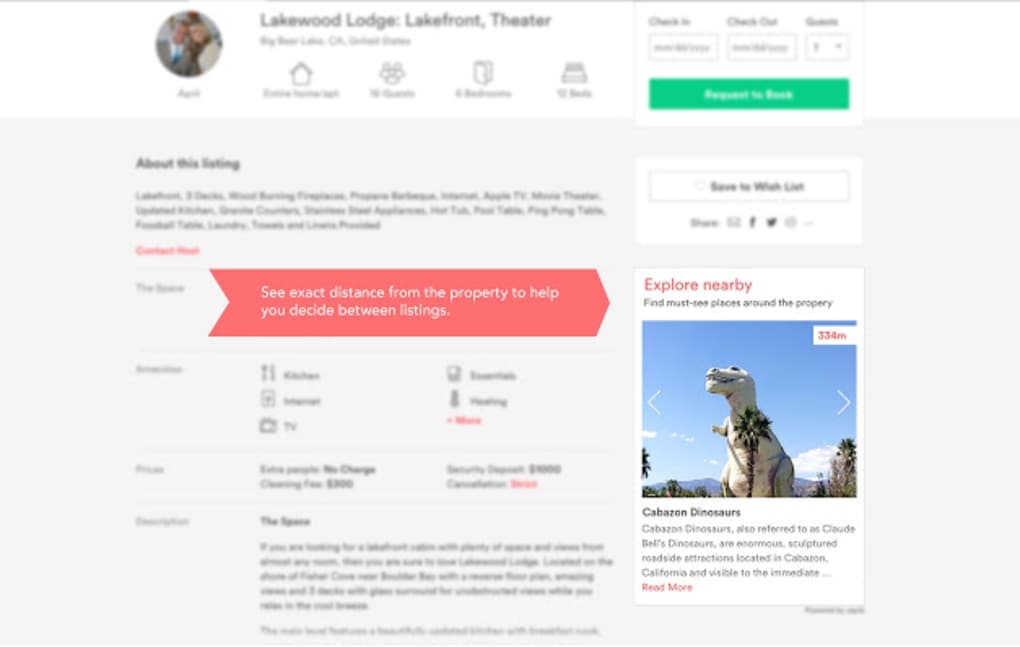
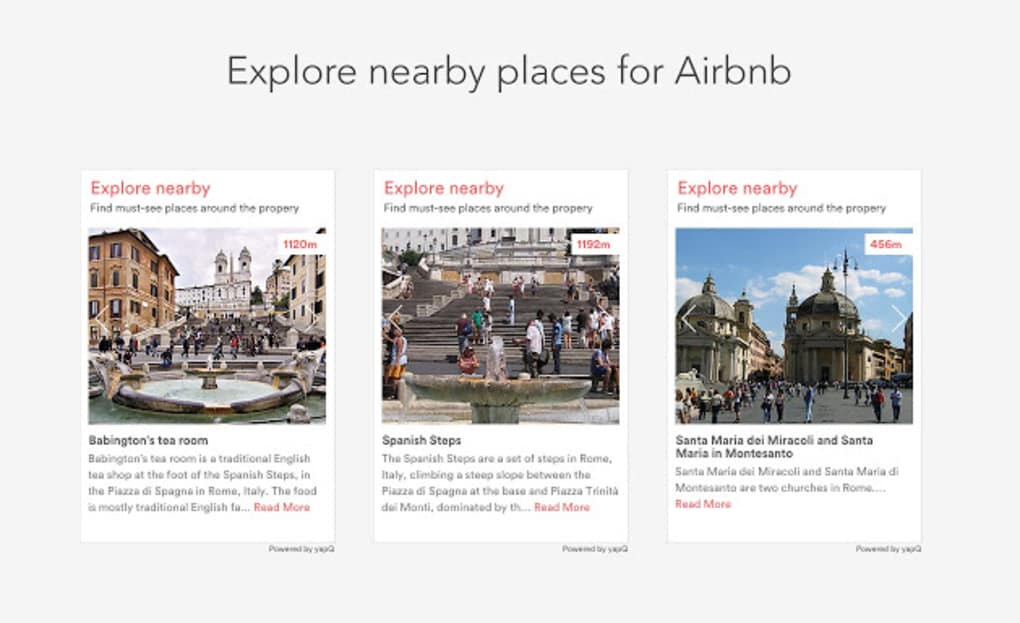
Explore nearby places is a free add‑on developed by yapQ.com that plugs directly into the Airbnb listing page and instantly shows a pop‑up with the most relevant points of interest around the property. The tool was created to solve a common pain point for travelers: many Airbnb hosts list vague distances or omit them entirely, leaving guests unsure whether a property is truly close to museums, beaches, restaurants, or public transport hubs. With Explore nearby places, the distance to each attraction is calculated in real‑time, displayed in both kilometres and minutes of walking, and accompanied by a short description and a thumbnail image.
After a booking is confirmed, users can log into yapQ.com, drag‑and‑drop the highlighted attractions into a personal itinerary, and export the plan to Google Maps or PDF. The add‑on works on any modern browser, requires no registration to view the pop‑up, and respects Airbnb’s terms of service by operating entirely on the client side. Whether you’re a solo backpacker looking for a hostel near the city centre, a family needing a park within walking distance, or a business traveller seeking the nearest conference venue, Explore nearby places adds the clarity that Airbnb listings often lack, making the decision‑making process faster, safer, and more enjoyable.
Key Features
- Instant distance calculation: Shows exact kilometres and estimated walking time for each nearby attraction.
- Attraction summaries: Each point of interest includes a brief description, opening hours, and a thumbnail image.
- Custom itinerary builder: After booking, users can create a personalised list of attractions on yapQ.com and export it.
- Cross‑platform compatibility: Works on Windows, macOS, Android, and iOS browsers without additional software.
- Free and secure: No hidden fees, no personal data is stored without consent, and the add‑on runs locally in the browser.
- One‑click activation: Simple bookmarklet or Chrome/Firefox extension that activates on any Airbnb listing page.
- Offline cache: Frequently accessed city data is cached, allowing quick look‑ups even on slow connections.
- Multi‑language support: Interface available in English, Spanish, French, German, and Japanese.
Installation & Usage Instructions
Getting started with Explore nearby places is straightforward and takes less than two minutes. Follow these steps:
- Download the extension: Visit the official yapQ.com download page and click the “Add to Chrome” or “Add to Firefox” button. For users on Safari, Edge, or mobile browsers, a bookmarklet version is provided.
- Install the add‑on: After confirming the installation prompt, the extension icon will appear next to your browser’s address bar.
- Activate on Airbnb: Open any Airbnb listing. Click the Explore nearby places icon; a small pop‑up will appear prompting permission to access the page’s location data. Grant permission.
- View nearby attractions: The pop‑up displays a map‑less list of attractions sorted by proximity. Distances are shown in both kilometres and estimated walking minutes.
- Save attractions: Click the “Add to itinerary” button next to any attraction you want to visit. The item is stored in a temporary session cache.
- Finalize after booking: Once you confirm your reservation, you’ll receive a link to the yapQ.com itinerary builder. Log in (or continue as guest), review your saved attractions, reorder them, and click “Export to Google Maps” or “Download PDF”.
The add‑on automatically updates its database every 24 hours, ensuring new attractions, restaurant openings, and seasonal events are reflected. If you encounter any issues, the built‑in “Help & Feedback” button opens a support chat powered by yapQ’s customer team, which typically responds within an hour.
Compatibility, Pros & Cons
Explore nearby places runs on any modern web browser, including Chrome 89+, Firefox 78+, Edge 90+, Safari 14+, as well as mobile browsers on Android 8+ and iOS 13+. Because the tool works client‑side, there is no need for separate Windows, macOS, or Linux installations. The only requirement is an active internet connection for the initial data fetch; after the first load, most city data is cached locally.
Pros
- Completely free with no hidden subscription fees.
- Provides exact distances and walking times, eliminating guesswork.
- Integrates seamlessly into the Airbnb UI without disrupting the booking flow.
- Custom itinerary builder saves time on trip planning.
- Regular data updates keep attractions current.
- Lightweight, fast loading, and works on low‑bandwidth connections.
Cons
- Relies on browser permissions; users must allow location access.
- Only covers attractions that are publicly listed in the yapQ database (some niche spots may be missing).
- No native mobile app – functionality is limited to the browser environment.
- Cache may become outdated if the user does not refresh the page after a long period.
Frequently Asked Questions
Is Explore nearby places really free?
Yes, the add‑on is completely free for all users. There are no hidden fees, subscription plans, or in‑app purchases. The development is supported by optional donations on the yapQ website.
Will the add‑on share my personal Airbnb data with third parties?
No. Explore nearby places only reads the public listing URL and the location coordinates displayed on the page. No personal login credentials or payment information are ever transmitted to yapQ servers.
Can I use the tool on mobile devices?
Absolutely. The bookmarklet version works on Chrome, Safari, and Firefox mobile browsers. After adding the bookmarklet to your home screen, tap it while viewing an Airbnb listing to see nearby attractions.
How often is the attraction database updated?
The database refreshes automatically every 24 hours. Major city updates (new museums, reopened venues, etc.) are pushed within a few hours of verification.
What should I do if the pop‑up does not appear?
First, ensure the extension is enabled in your browser’s extensions page. Next, confirm that you have allowed location permissions for Airbnb.com. If the issue persists, clear the browser cache or reinstall the add‑on from the official yapQ site.
Conclusion & Call to Action
Explore nearby places fills a clear gap in the Airbnb ecosystem by delivering precise, real‑time information about surrounding attractions. Its free, lightweight design, combined with a powerful itinerary builder, transforms a simple accommodation search into a complete travel‑planning experience. Whether you are a first‑time traveller, a seasoned digital nomad, or a family looking for kid‑friendly sites, the add‑on equips you with the data needed to make an informed decision and maximize your stay. Because it integrates directly into the Airbnb interface, you never have to switch tabs or copy‑paste addresses—everything you need appears in a clean pop‑up, saving time and reducing stress.
Ready to travel smarter? Download Explore nearby places now and start discovering the true distance to every museum, cafe, park, and transit hub before you click “Book”. Your next adventure is only a few clicks away.







